Monitor & control your Antminer S23 from anywhere
AntminerTools gives you live hashrate, per-chain chip & PCB temperatures, power draw and remote reboot for your Antminer S23 fleet — on your phone or desktop, with no port forwarding and no VPN. Setup takes 2 minutes.
Create free account →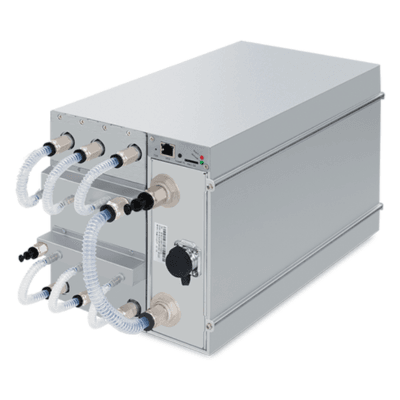
Antminer S23 — models & specifications
Manufacturer-rated values; they vary by batch and work mode. AntminerTools reads live values directly from each unit.
| Model | Hashrate | Power | Cooling |
|---|---|---|---|
| Antminer S23 Hyd. | 580 TH/s | 5510 W | Hydro |
| Antminer S23 Hyd. 3U | 1160 TH/s | 11020 W | Hydro |
| Antminer S23 | 296–318 TH/s | 3498 W | Air |
| Antminer S23 Immersion | 442 TH/s | 5304 W | Immersion |
How to monitor your Antminer S23
Run the lightweight connector agent on any PC or Raspberry Pi on your farm's network, click Scan, and every Antminer S23 on your subnet appears automatically — model, worker name, serial and MAC included. From then on it's live stats every 30 seconds.
Everything you get for your Antminer S23
Running the Antminer S23 day to day — what to watch
Antminer S23 rigs mine SHA-256 (Bitcoin). Specs tell you what the machine can do; day-to-day monitoring is about noticing early when it stops doing it. Here is what experienced operators watch on this model, and how to automate it.
Temperatures and cooling
The S23 generation is hydro-first: coolant loop health matters as much as air ever did. Watch inlet/outlet water temperature spread and keep chip temperatures well under the 85 °C alert line — on a healthy loop they sit dramatically lower than air-cooled predecessors.
Power, efficiency and what they cost
Across the variants above, efficiency works out to roughly 10–12 J/TH at wall power — the Antminer S23 Hyd. is the efficiency leader of the family. At $0.06/kWh, every 100 W of extra draw costs about $4.30 a month, which is why the dashboard tracks efficiency per unit and not just raw hashrate.
The signals that matter
With efficiency this deep below 15 J/TH, small percentage losses are real money: a 5 % hashrate sag on a large S23 deployment is the output of an entire older miner. Set the hashrate-low threshold tighter here than you would on an S19-class fleet.
Hydro units that report 0 °C chip temperature in other tools are exposing readings in a different sensor field — AntminerTools reads the correct one automatically.
Recommended alert setup for the Antminer S23: a high-temperature rule at 85 °C chip temp, a hashrate-zero rule with auto-restart (a ten-minute boot grace stops false alarms after reboots), and an offline rule that emails you about a minute after a unit stops answering. All three take under a minute to create in Alerts — see the docs for details, or the guide to monitoring your fleet remotely.
Antminer S23 monitoring — frequently asked questions
How do I monitor my Antminer S23 remotely?
Create a free farm, run the connector agent on any PC or Raspberry Pi on the same network as your Antminer S23, then hit Scan. You'll see live hashrate and temperatures within a minute, from anywhere — no port forwarding, no VPN, no static IP.
Can I see Antminer S23 temperatures and get overheat alerts?
Yes. AntminerTools reads per-chain chip and PCB temperatures every 30 seconds and can automatically put an Antminer S23 to sleep if it overheats, plus email you on the Unlimited plan.
Does it work with every Antminer S23 variant?
Yes — every Antminer S23 running stock Bitmain firmware with the standard web interface is supported, including Hydro and immersion variants, with special handling for water-cooled temperature sensors.
How much does Antminer S23 monitoring cost?
Free for 1 farm and up to 4 miners with full monitoring and remote control. Paid plans add capacity from $3/mo, and email alerts + remote desktop on Unlimited.
Start monitoring your Antminer S23 — free
Create your account, run the agent, and see every Antminer S23 live — before your coffee gets cold.
Create free account →